LibreOffice Programming Solver Example
This Example came out as a result of a game called mousehunt (there is alot of statistic and mean-max programming opportunities, its all fake of course, but it does create interesting data to play with =P)
You can download it from here! =P
You will need to download it, Google docs does not recognise the macros, but if you download it, it will still contain the macros. Just follow the following instructions to run the macro:
1) Key in the amounts of the toy parts that you have collected

2) Open up LibreOffice Basic as shown (OpenOffice should also be able to... but I am not sure how =P -- but definitely it can run the macro!)

3) Select as shown and click "Run"
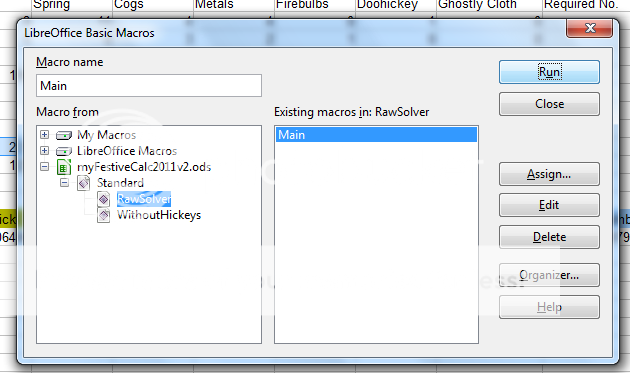
4) You will see the solver run
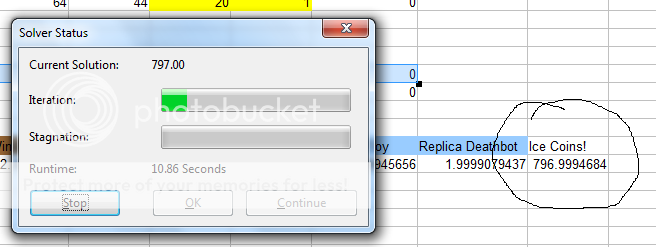
5) The result will be as shown, but you may need to round off =)

The important things to note are (at least the mistakes I made while writing the code):
1) VBA arrays start from 0, when you declare them, declare the last index, not the size. So a size 10 will be array(9) for instance.
2) The "getCellByPosition(10,14)", is (column,row) NOT (row,column) or (x-axis,y-axis) as is more the norm in other languages and tools
In order words, there are the usual VB eccentricities =P
3) For LibreOffice 3.4.x
You can enable 'Record Macro' via
'Tools > Options > LibreOffice > General
☑ Enable experimental (unstable) features'. ---- you don't really need this
4) You may need to enable macros to run macros... duh.
I posted this as i had a hard time looking for something to script VBA Solver code into LibreOffice.
I gave up then tried the macro recording but that did'nt work out... then looked again and luckily i found this!
Other useful links
1) This was useful to figure out the column,row thing.
2) This explained why my LibreOffice did not have a record macro button! =/ Which i did'nt se in the end.
3) This was the most useful! The motherlode!! Thanks to FJCC for his example code in 2009 in the 4th post! I thank you! Even though I do not know you =) The example code I wrote was made by modifying his code which had everything needed inside! Very good code! =D
Below is the code in download (not FJCC's - you can see it by following the link in point 3 above =) )
----------------------------------------------------Code--------
REM ***** BASIC *****
sub Main
rem ----------------------------------------------------------------------
rem define variables
dim document as object
dim dispatcher as object
rem ----------------------------------------------------------------------
rem get access to the document
document = ThisComponent.CurrentController.Frame
dispatcher = createUnoService("com.sun.star.frame.DispatchHelper")
rem ----------------------------------------------------------------------
rem -- dispatcher.executeDispatch(document, ".uno:SolverDialog", "", 0, Array())
Dim Variables(8) as Object
Dim Constraint_0 as New com.sun.star.sheet.SolverConstraint
Dim Constraint_1 as New com.sun.star.sheet.SolverConstraint
Dim Constraint_2 as New com.sun.star.sheet.SolverConstraint
Dim Constraint_3 as New com.sun.star.sheet.SolverConstraint
Dim Constraint_4 as New com.sun.star.sheet.SolverConstraint
Dim Constraint_5 as New com.sun.star.sheet.SolverConstraint
Dim Constraint_6 as New com.sun.star.sheet.SolverConstraint
Dim Constraint_7 as New com.sun.star.sheet.SolverConstraint
Dim Constraints(7) as Object
smgr = GetProcessServiceManager()
solv = smgr.createInstance("com.sun.star.sheet.Solver")
ConstrOperator1 = com.sun.star.sheet.SolverConstraintOperator.LESS_EQUAL
ConstrOperator2 = com.sun.star.sheet.SolverConstraintOperator.GREATER_EQUAL
oDoc = ThisComponent
solv.Document = oDoc
Sheet = oDoc.Sheets(0)
Sheet1 = oDoc.Sheets(1)
ObjectiveCell = Sheet.getCellByPosition(10,14) 'This cell has the formula =A1 +B1 - C1
solv.Objective = ObjectiveCell.CellAddress
VariCell0 = Sheet.getCellByPosition(1,14)
Variables(0) = VariCell0.CellAddress
VariCell1 = Sheet.getCellByPosition(2,14)
Variables(1) = VariCell1.CellAddress
VariCell2 = Sheet.getCellByPosition(3,14)
Variables(2) = VariCell2.CellAddress
VariCell3 = Sheet.getCellByPosition(4,14)
Variables(3) = VariCell3.CellAddress
VariCell4 = Sheet.getCellByPosition(5,14)
Variables(4) = VariCell4.CellAddress
VariCell5 = Sheet.getCellByPosition(6,14)
Variables(5) = VariCell5.CellAddress
VariCell6 = Sheet.getCellByPosition(7,14)
Variables(6) = VariCell6.CellAddress
VariCell7 = Sheet.getCellByPosition(8,14)
Variables(7) = VariCell7.CellAddress
VariCell8 = Sheet.getCellByPosition(9,14)
Variables(8) = VariCell8.CellAddress
solv.Variables = Variables()
Constraint_0.Left = Sheet1.getCellByPosition(1,12).CellAddress
Constraint_0.Operator = ConstrOperator1
Constraint_0.Right = Sheet.getCellByPosition(1,9).CellAddress
Constraints(0) = Constraint_0
Constraint_1.Left = Sheet1.getCellByPosition(2,12).CellAddress
Constraint_1.Operator = ConstrOperator1
Constraint_1.Right = Sheet.getCellByPosition(3,9).CellAddress
Constraints(1) = Constraint_1
Constraint_2.Left = Sheet1.getCellByPosition(3,12).CellAddress
Constraint_2.Operator = ConstrOperator1
Constraint_2.Right = Sheet.getCellByPosition(2,9).CellAddress
Constraints(2) = Constraint_2
Constraint_3.Left = Sheet1.getCellByPosition(4,12).CellAddress
Constraint_3.Operator = ConstrOperator1
Constraint_3.Right = Sheet.getCellByPosition(4,9).CellAddress
Constraints(3) = Constraint_3
Constraint_4.Left = Sheet1.getCellByPosition(5,12).CellAddress
Constraint_4.Operator = ConstrOperator1
Constraint_4.Right = Sheet.getCellByPosition(5,9).CellAddress
Constraints(4) = Constraint_4
Constraint_5.Left = Sheet1.getCellByPosition(6,12).CellAddress
Constraint_5.Operator = ConstrOperator1
Constraint_5.Right = Sheet.getCellByPosition(8,9).CellAddress
Constraints(5) = Constraint_5
Constraint_6.Left = Sheet1.getCellByPosition(7,12).CellAddress
Constraint_6.Operator = ConstrOperator1
Constraint_6.Right = Sheet.getCellByPosition(6,9).CellAddress
Constraints(6) = Constraint_6
Constraint_7.Left = Sheet1.getCellByPosition(8,12).CellAddress
Constraint_7.Operator = ConstrOperator1
Constraint_7.Right = Sheet.getCellByPosition(7,9).CellAddress
Constraints(7) = Constraint_7
solv.Constraints = Constraints()
solv.Maximize = True
solv.Solve()
Print solv.ResultValue
end sub
-------------------------End Code
You can download it from here! =P
You will need to download it, Google docs does not recognise the macros, but if you download it, it will still contain the macros. Just follow the following instructions to run the macro:
1) Key in the amounts of the toy parts that you have collected
2) Open up LibreOffice Basic as shown (OpenOffice should also be able to... but I am not sure how =P -- but definitely it can run the macro!)
3) Select as shown and click "Run"
4) You will see the solver run
5) The result will be as shown, but you may need to round off =)
The important things to note are (at least the mistakes I made while writing the code):
1) VBA arrays start from 0, when you declare them, declare the last index, not the size. So a size 10 will be array(9) for instance.
2) The "getCellByPosition(10,14)", is (column,row) NOT (row,column) or (x-axis,y-axis) as is more the norm in other languages and tools
In order words, there are the usual VB eccentricities =P
3) For LibreOffice 3.4.x
You can enable 'Record Macro' via
'Tools > Options > LibreOffice > General
☑ Enable experimental (unstable) features'. ---- you don't really need this
4) You may need to enable macros to run macros... duh.
I posted this as i had a hard time looking for something to script VBA Solver code into LibreOffice.
I gave up then tried the macro recording but that did'nt work out... then looked again and luckily i found this!
Other useful links
1) This was useful to figure out the column,row thing.
2) This explained why my LibreOffice did not have a record macro button! =/ Which i did'nt se in the end.
3) This was the most useful! The motherlode!! Thanks to FJCC for his example code in 2009 in the 4th post! I thank you! Even though I do not know you =) The example code I wrote was made by modifying his code which had everything needed inside! Very good code! =D
Below is the code in download (not FJCC's - you can see it by following the link in point 3 above =) )
----------------------------------------------------Code--------
REM ***** BASIC *****
sub Main
rem ----------------------------------------------------------------------
rem define variables
dim document as object
dim dispatcher as object
rem ----------------------------------------------------------------------
rem get access to the document
document = ThisComponent.CurrentController.Frame
dispatcher = createUnoService("com.sun.star.frame.DispatchHelper")
rem ----------------------------------------------------------------------
rem -- dispatcher.executeDispatch(document, ".uno:SolverDialog", "", 0, Array())
Dim Variables(8) as Object
Dim Constraint_0 as New com.sun.star.sheet.SolverConstraint
Dim Constraint_1 as New com.sun.star.sheet.SolverConstraint
Dim Constraint_2 as New com.sun.star.sheet.SolverConstraint
Dim Constraint_3 as New com.sun.star.sheet.SolverConstraint
Dim Constraint_4 as New com.sun.star.sheet.SolverConstraint
Dim Constraint_5 as New com.sun.star.sheet.SolverConstraint
Dim Constraint_6 as New com.sun.star.sheet.SolverConstraint
Dim Constraint_7 as New com.sun.star.sheet.SolverConstraint
Dim Constraints(7) as Object
smgr = GetProcessServiceManager()
solv = smgr.createInstance("com.sun.star.sheet.Solver")
ConstrOperator1 = com.sun.star.sheet.SolverConstraintOperator.LESS_EQUAL
ConstrOperator2 = com.sun.star.sheet.SolverConstraintOperator.GREATER_EQUAL
oDoc = ThisComponent
solv.Document = oDoc
Sheet = oDoc.Sheets(0)
Sheet1 = oDoc.Sheets(1)
ObjectiveCell = Sheet.getCellByPosition(10,14) 'This cell has the formula =A1 +B1 - C1
solv.Objective = ObjectiveCell.CellAddress
VariCell0 = Sheet.getCellByPosition(1,14)
Variables(0) = VariCell0.CellAddress
VariCell1 = Sheet.getCellByPosition(2,14)
Variables(1) = VariCell1.CellAddress
VariCell2 = Sheet.getCellByPosition(3,14)
Variables(2) = VariCell2.CellAddress
VariCell3 = Sheet.getCellByPosition(4,14)
Variables(3) = VariCell3.CellAddress
VariCell4 = Sheet.getCellByPosition(5,14)
Variables(4) = VariCell4.CellAddress
VariCell5 = Sheet.getCellByPosition(6,14)
Variables(5) = VariCell5.CellAddress
VariCell6 = Sheet.getCellByPosition(7,14)
Variables(6) = VariCell6.CellAddress
VariCell7 = Sheet.getCellByPosition(8,14)
Variables(7) = VariCell7.CellAddress
VariCell8 = Sheet.getCellByPosition(9,14)
Variables(8) = VariCell8.CellAddress
solv.Variables = Variables()
Constraint_0.Left = Sheet1.getCellByPosition(1,12).CellAddress
Constraint_0.Operator = ConstrOperator1
Constraint_0.Right = Sheet.getCellByPosition(1,9).CellAddress
Constraints(0) = Constraint_0
Constraint_1.Left = Sheet1.getCellByPosition(2,12).CellAddress
Constraint_1.Operator = ConstrOperator1
Constraint_1.Right = Sheet.getCellByPosition(3,9).CellAddress
Constraints(1) = Constraint_1
Constraint_2.Left = Sheet1.getCellByPosition(3,12).CellAddress
Constraint_2.Operator = ConstrOperator1
Constraint_2.Right = Sheet.getCellByPosition(2,9).CellAddress
Constraints(2) = Constraint_2
Constraint_3.Left = Sheet1.getCellByPosition(4,12).CellAddress
Constraint_3.Operator = ConstrOperator1
Constraint_3.Right = Sheet.getCellByPosition(4,9).CellAddress
Constraints(3) = Constraint_3
Constraint_4.Left = Sheet1.getCellByPosition(5,12).CellAddress
Constraint_4.Operator = ConstrOperator1
Constraint_4.Right = Sheet.getCellByPosition(5,9).CellAddress
Constraints(4) = Constraint_4
Constraint_5.Left = Sheet1.getCellByPosition(6,12).CellAddress
Constraint_5.Operator = ConstrOperator1
Constraint_5.Right = Sheet.getCellByPosition(8,9).CellAddress
Constraints(5) = Constraint_5
Constraint_6.Left = Sheet1.getCellByPosition(7,12).CellAddress
Constraint_6.Operator = ConstrOperator1
Constraint_6.Right = Sheet.getCellByPosition(6,9).CellAddress
Constraints(6) = Constraint_6
Constraint_7.Left = Sheet1.getCellByPosition(8,12).CellAddress
Constraint_7.Operator = ConstrOperator1
Constraint_7.Right = Sheet.getCellByPosition(7,9).CellAddress
Constraints(7) = Constraint_7
solv.Constraints = Constraints()
solv.Maximize = True
solv.Solve()
Print solv.ResultValue
end sub
-------------------------End Code
Labels: Basic, Calc, code, Excel, free code, freedom, gnu, integer, Libreoffice, OPEN SOURCE, openoffice, programming, sheet, Solver, VBA
posted by god_is_good478 at 11:49 PM
2 comments



 |
| 
